
Introduction #
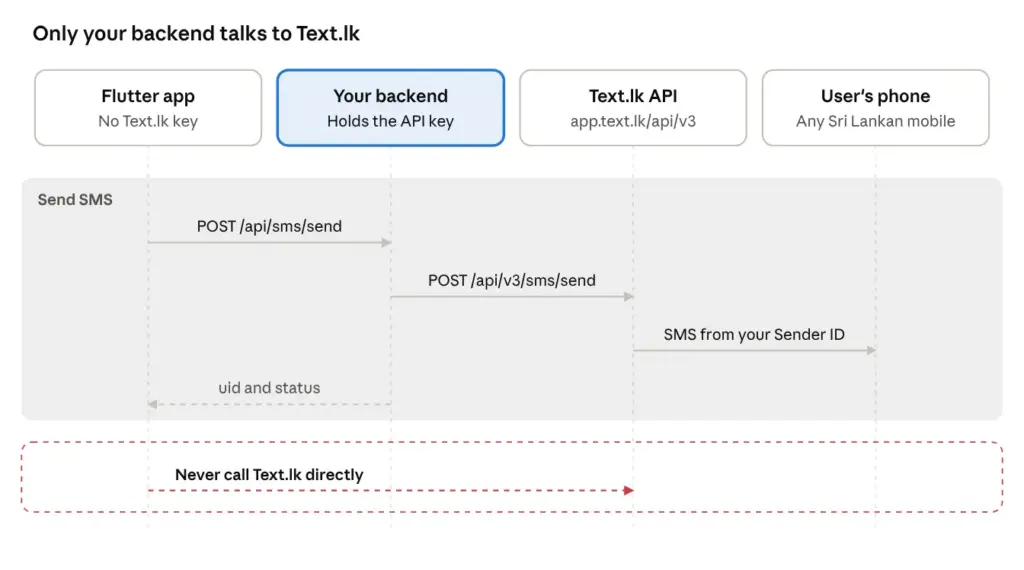
Your Flutter app should never call the Text.lk SMS API directly. The app asks your backend to send the SMS, and only the backend talks to Text.lk. This guide shows how to build that backend and connect your Flutter app to it.
Anything inside an .apk or .ipa can be extracted. If your Text.lk API key is in the app, anyone can take it, spend your prepaid SMS balance and send messages under your approved Sender ID. Flutter’s own docs say code obfuscation doesn’t encrypt resources or protect against reverse engineering, so obfuscating the app doesn’t protect the key. Hardcoded secrets fall under M1, Improper Credential Usage, in the OWASP Mobile Top 10.
By the end you’ll have:
- A Node.js backend that sends SMS through
POST https://app.text.lk/api/v3/sms/sendwith a Bearer token. - A protected
/api/sms/sendroute that only sends messages your server has written, to numbers your server allows. - A Flutter client and screen that talk only to your backend.
The backend uses Node.js and Express, but the same design works in Laravel, Django, Firebase Cloud Functions or Supabase Edge Functions. If you build web apps too, see the Text.lk Next.js guide or the Text.lk PHP guide.
How it fits together #
The app asks your backend to send an SMS, and only your backend calls Text.lk. The app proves who the user is with its own login token, never with the Text.lk API key.
| Part | Does | Never does |
|---|---|---|
| Flutter app | Sends the user’s login token and a template name to your backend | Holds the Text.lk API key, writes the SMS text, picks the recipient |
| Your backend | Holds the key, checks the user, writes the SMS from a template, applies rate limits, calls Text.lk | Sends free text from the app to a number the app chose |
| Text.lk | Delivers the SMS from your Sender ID and returns a uid | Talks to your app |
Prerequisites #
You need a Text.lk account, an API key and a Sender ID before writing any code.
- Create an account. Register at text.lk and log in to the dashboard.
- Copy your API key. In the dashboard sidebar, open Developers and copy the API token. How to get your Text.lk API key shows each step, including how to regenerate a key that has leaked. The key goes only into your backend’s environment variables.
- Choose a Sender ID. Use
TextLKDemofor testing. For production, use your own approved Sender ID: a phone number with country code, or up to 11 letters and numbers. See thesender_idparameter in Send SMS.
On your machine:
| What | Where it lives | Who can see it |
|---|---|---|
| Text.lk API key | Backend environment variable | Backend only |
| Sender ID | Backend environment variable | Backend only |
| User’s login token (Firebase, Supabase or your own) | Sent by the app with each request | The signed-in user’s device and your backend |
Step 1: Set up the backend #
The backend holds the API key and is the only code that calls Text.lk.
sms-backend/
  .env
  server.js
  lib/
    textlk.js     Text.lk client (the only file that reads the API key)
    phone.js      Sri Lankan number normaliser
    auth.js       Checks the user's login token
  routes/
sms.js Step 2: the send SMS routeInstall #
mkdir sms-backend && cd sms-backend
npm init -y
npm install express axios dotenv express-rate-limit jsonwebtokenEnvironment variables #
Add .env to .gitignore before you create it. In production, keep these values in your host’s secret manager.
PORT=3000
TEXTLK_API_TOKEN=paste_your_textlk_api_key_here
TEXTLK_SENDER_ID=TextLKDemo

# The secret your auth server signs login tokens with
APP_JWT_SECRET=change_melib/textlk.js #
This file calls the OAuth 2.0 endpoint described in the Text.lk API Endpoints Introduction. Text.lk also offers an HTTP GET endpoint that puts api_token in the URL (SMS API Endpoints). Don’t use that from a server, because proxies and access logs can record the URL with your key in it.
const axios = require('axios');

const client = axios.create({
  baseURL: 'https://app.text.lk/api/v3',
  timeout: 15000,
  headers: {
    Authorization: `Bearer ${process.env.TEXTLK_API_TOKEN}`,
    'Content-Type': 'application/json',
    Accept: 'application/json',
  },
});

// The Text.lk docs show both "success" and true as the success value, so accept either.
const isOk = (body) => body && (body.status === 'success' || body.status === true);

async function sendSms({ to, message, scheduleTime }) {
  const body = {
    recipient: to,                       // 947XXXXXXXX, or several joined with commas
    sender_id: process.env.TEXTLK_SENDER_ID,
    type: 'plain',
    message,
  };
  if (scheduleTime) body.schedule_time = scheduleTime; // 'YYYY-MM-DD HH:mm'

  const { data } = await client.post('/sms/send', body);
  if (!isOk(data)) throw new Error(data?.message || 'Text.lk rejected the request');
  return data.data; // uid, to, from, status, cost, sms_count
}

module.exports = { sendSms };lib/phone.js #
People type numbers as 0771234567, 771234567 or +94 77 123 4567. Text.lk expects 94771234567.
function toTextlkNumber(input) {
  let n = String(input || '').replace(/\D/g, '');
  if (n.startsWith('0')) n = '94' + n.slice(1);
  else if (n.length === 9 && n.startsWith('7')) n = '94' + n;
  return /^947\d{8}$/.test(n) ? n : null; // Sri Lankan mobile numbers only
}

module.exports = { toTextlkNumber };lib/auth.js #
Only signed-in users may trigger an SMS. This example checks a JWT from your own auth server and reads the user’s verified phone number from it. If you use Firebase Auth or Supabase Auth, check their ID token here instead and read the phone number from it.
const jwt = require('jsonwebtoken');
const { toTextlkNumber } = require('./phone');

function requireUser(req, res, next) {
  const token = (req.headers.authorization || '').replace(/^Bearer /, '');
  try {
    const claims = jwt.verify(token, process.env.APP_JWT_SECRET);
    req.user = { id: claims.sub, phone: toTextlkNumber(claims.phone) };
    if (!req.user.phone) return res.status(403).json({ error: 'no_verified_phone' });
    next();
  } catch {
    res.status(401).json({ error: 'unauthorized' });
  }
}

module.exports = { requireUser };server.js #
require('dotenv').config();
const express = require('express');

const app = express();
app.set('trust proxy', 1); // so rate limits see the real client IP behind a load balancer
app.use(express.json({ limit: '16kb' }));

app.use('/api/sms', require('./routes/sms'));

app.get('/health', (_req, res) => res.json({ ok: true }));
app.listen(process.env.PORT || 3000, () => console.log('SMS backend ready'));Step 2: Add the send SMS route #
The app chooses a template by name. The backend writes the message and sends it to the signed-in user’s verified number. Never build a route that takes a phone number and free text from the app, because anyone with your app could then send any SMS to any number under your Sender ID.
| Rule | Value | Why |
|---|---|---|
| Message text | Only from TEMPLATES on the server | The app can’t write its own SMS |
| Recipient | Always req.user.phone | The app can’t choose who receives it |
| Template values | Letters, numbers and .,- only, 40 characters at most | Nobody can inject links or long text |
| Per user | 10 SMS an hour | Protects your balance if one account is abused |
| Per IP | 30 requests every 15 minutes | Slows down scripted attacks |
The limits use express-rate-limit. Its default store is in memory, so if you run more than one server, add a shared store such as Redis.
routes/sms.js #
const express = require('express');
const rateLimit = require('express-rate-limit');
const { sendSms } = require('../lib/textlk');
const { requireUser } = require('../lib/auth');

const router = express.Router();

// Every SMS your app can send is listed here, on the server.
const TEMPLATES = {
  order_confirmed: (p) => `MyApp: Order #${p.orderId} is confirmed. Total LKR ${p.total}. Thank you!`,
  order_shipped: (p) => `MyApp: Order #${p.orderId} is on the way. Track it in the app.`,
  order_confirmed_si: (p) => `MyApp: ඔබගේ ඇණවුම #${p.orderId} තහවුරු කර ඇත.`, // Unicode: 70 characters per SMS part
};

const clean = (v) => String(v ?? '').replace(/[^\w .,-]/g, '').slice(0, 40);

const perIp = rateLimit({ windowMs: 15 * 60 * 1000, limit: 30, standardHeaders: true, legacyHeaders: false });
const perUser = rateLimit({
  windowMs: 60 * 60 * 1000,
  limit: 10,
  keyGenerator: (req) => req.user.id, // count per signed-in user, not per IP
  message: { error: 'too_many_requests' },
});

// POST /api/sms/send   { "template": "order_confirmed", "params": { "orderId": "1042", "total": "4500" } }
router.post('/send', perIp, requireUser, perUser, async (req, res) => {
  const build = TEMPLATES[req.body.template];
  if (!build) return res.status(400).json({ error: 'unknown_template' });

  const params = Object.fromEntries(
    Object.entries(req.body.params || {}).map(([k, v]) => [k, clean(v)]),
  );

  try {
    const sms = await sendSms({ to: req.user.phone, message: build(params) });
    res.json({ uid: sms.uid, status: sms.status, smsCount: sms.sms_count });
  } catch (err) {
    // Log Text.lk's reason on the server; never return it, or the API key, to the app.
    console.error('Text.lk send failed:', err.response?.status, err.response?.data || err.message);
    res.status(502).json({ error: 'sms_failed' });
  }
});

module.exports = router;Keep the uid from each response if you want to check delivery later. The View SMS endpoint looks a message up by that ID.
Keep templates short. An English SMS fits 160 characters per part. Sinhala, Tamil or one emoji switches the message to Unicode, which fits only 70 characters per part, so a long Unicode message can be charged as two or three SMS.
To send later, pass scheduleTime (for example '2026-12-20 07:00') to sendSms. The Text.lk docs don’t say which time zone this uses, so test it before you depend on it.
Step 3: Connect the Flutter app #
The Flutter app knows one URL, your backend. It sends the user’s login token and a template name, and nothing in it refers to Text.lk.
pubspec.yaml #
Add the http package (Flutter’s Fetch data from the internet guide covers the basics):
dependencies:
  flutter:
    sdk: flutter
http: ^1.6.0Set the backend URL at build time, so test and production builds can point to different servers:
flutter run --dart-define=API_BASE_URL=https://api.yourdomain.lklib/sms_api.dart #
getToken returns the signed-in user’s login token. With Firebase Auth, that’s FirebaseAuth.instance.currentUser?.getIdToken().
import 'dart:convert';
import 'package:http/http.dart' as http;

class SmsException implements Exception {
  SmsException(this.statusCode, this.code);
  final int statusCode;
  final String code; // unknown_template, too_many_requests, sms_failed, unauthorized
  @override
  String toString() => 'SmsException($statusCode, $code)';
}

class SmsResult {
  SmsResult(this.uid, this.status, this.smsCount);
  final String uid;
  final String? status;
  final int? smsCount;
}

class SmsApi {
  SmsApi({required this.getToken, http.Client? client}) : _http = client ?? http.Client();

  static const _baseUrl = String.fromEnvironment('API_BASE_URL');
  final Future<String?> Function() getToken;
  final http.Client _http;

  /// Asks your backend to send an SMS template to the signed-in user.
  Future<SmsResult> send(String template, {Map<String, String> params = const {}}) async {
    final token = await getToken();
    if (token == null) throw SmsException(401, 'unauthorized');

    final res = await _http
        .post(
          Uri.parse('$_baseUrl/api/sms/send'),
          headers: {
            'Content-Type': 'application/json',
            'Accept': 'application/json',
            'Authorization': 'Bearer $token',
          },
          body: jsonEncode({'template': template, 'params': params}),
        )
        .timeout(const Duration(seconds: 20));

    final data = res.body.isEmpty ? <String, dynamic>{} : jsonDecode(res.body) as Map<String, dynamic>;
    if (res.statusCode != 200) {
      throw SmsException(res.statusCode, data['error']?.toString() ?? 'unknown_error');
    }
    return SmsResult(data['uid'] as String, data['status'] as String?, data['smsCount'] as int?);
  }
}lib/send_sms_screen.dart #
import 'package:flutter/material.dart';
import 'sms_api.dart';

class SendSmsScreen extends StatefulWidget {
  const SendSmsScreen({super.key, required this.api, required this.orderId, required this.total});
  final SmsApi api;
  final String orderId;
  final String total;

  @override
  State<SendSmsScreen> createState() => _SendSmsScreenState();
}

class _SendSmsScreenState extends State<SendSmsScreen> {
  bool _sending = false;
  bool _sinhala = false;

  static const _messages = {
    'too_many_requests': 'Too many messages. Try again later.',
    'unauthorized': 'Please sign in again.',
    'no_verified_phone': 'Add and verify your mobile number first.',
    'sms_failed': 'We could not send the SMS. Try again shortly.',
  };

  Future<void> _send() async {
    setState(() => _sending = true);
    String result;
    try {
      await widget.api.send(
        _sinhala ? 'order_confirmed_si' : 'order_confirmed',
        params: {'orderId': widget.orderId, 'total': widget.total},
      );
      result = 'Confirmation SMS sent';
    } on SmsException catch (e) {
      result = _messages[e.code] ?? 'Something went wrong. Try again.';
    } catch (_) {
      result = 'Check your internet connection.';
    }
    if (!mounted) return;
    setState(() => _sending = false);
    ScaffoldMessenger.of(context).showSnackBar(SnackBar(content: Text(result)));
  }

  @override
  Widget build(BuildContext context) {
    return Scaffold(
      appBar: AppBar(title: Text('Order #${widget.orderId}')),
      body: Padding(
        padding: const EdgeInsets.all(16),
        child: Column(crossAxisAlignment: CrossAxisAlignment.stretch, children: [
          SwitchListTile(
            title: const Text('Send in සිංහල'),
            value: _sinhala,
            onChanged: _sending ? null : (v) => setState(() => _sinhala = v),
          ),
          const SizedBox(height: 16),
          FilledButton(
            onPressed: _sending ? null : _send,
            child: _sending
                ? const SizedBox(height: 20, width: 20, child: CircularProgressIndicator(strokeWidth: 2))
                : const Text('Text me my order confirmation'),
          ),
        ]),
      ),
    );
  }
}Create the API once and pass it to the screen:
final smsApi = SmsApi(getToken: () async => FirebaseAuth.instance.currentUser?.getIdToken());Test it #
Test the backend with curl before you connect the app. Use your own mobile number so the test SMS reaches you.
- Start the backend:
node server.js - Make a test login token for your number. In production, your auth provider issues this.
node -e "require('dotenv').config(); console.log(require('jsonwebtoken').sign({ sub: 'test-user', phone: '0771234567' }, process.env.APP_JWT_SECRET, { expiresIn: '1h' }))" - Send a template SMS:
curl -X POST http://localhost:3000/api/sms/send \ -H 'Authorization: Bearer <token from step 2>' \ -H 'Content-Type: application/json' \ -d '{"template": "order_confirmed", "params": {"orderId": "1042", "total": "4500"}}'
You should get back auidand receive the SMS. Try again without theAuthorizationheader and you should get401. Send it 11 times in an hour and you should get429. - Run the Flutter app. On an Android emulator,
localhostis the emulator itself, so use--dart-define=API_BASE_URL=http://10.0.2.2:3000. Allow plain HTTP for debug builds only.
Production checklist #
- The Text.lk API key is only in backend environment variables. Search the Flutter project for
app.text.lkand the key, and expect zero matches. - The backend calls only
https://app.text.lk/api/v3/sms/sendwith a Bearer header, never the/api/httpendpoint withapi_tokenin the URL. - The send route takes a template name, not free text, and always sends to the signed-in user’s verified number.
- The send route needs a valid login token and has limits per user and per IP. Limits use a shared store if you run more than one server.
- Logs never include the API key or full message text.
- Low-balance alerts are on in your Text.lk dashboard, and you get an alert when sends start failing.
- Sinhala and Tamil templates fit 70 characters per SMS part.
- Your own Sender ID is approved and replaces
TextLKDemo. - If the key ever leaks, regenerate it in the dashboard (how) and update the backend. No app release is needed.
Troubleshooting #
| Symptom | Likely cause | Fix |
|---|---|---|
401 from Text.lk in your server log | Wrong or regenerated API key | Copy the key again from Developers and restart the backend |
401 from your backend | Missing or expired login token | Sign in again, and check that getToken returns a token |
403 no_verified_phone | The login token has no phone number | Have the user add and verify their mobile number |
400 unknown_template | Template name is misspelled, or missing from TEMPLATES | Match the app’s template names to the server’s |
| One message charged as 2 or 3 SMS | Unicode text or a long template | Shorten the template, or use English |
| App can’t reach the backend on Android | Emulator localhost, or plain HTTP blocked | Use 10.0.2.2, and HTTPS outside debug builds |
| Scheduled SMS sent at the wrong time | schedule_time time zone isn’t documented | Send a test and compare, or ask Text.lk support |
Related Text.lk guides #
- Send SMS: every parameter of
POST /api/v3/sms/send - View SMS: look up a sent message by its
uid - API Endpoints Introduction: OAuth 2.0 and HTTP authentication compared
- SMS API Endpoints: every SMS endpoint on one page
- How to get your Text.lk API key
- Send SMS Campaign: send to a contact list
- Text.lk Next.js Integration Guide
- Text.lk PHP Integration Guide
- Text.lk iOS (Swift) Integration Guide
- Text.lk C# Integration Guide
- Text.lk Zapier Integration Guide
External references #
- http package on pub.dev: the Dart HTTP client used in Step 3
- Flutter: Fetch data from the internet
- Flutter: Obfuscate Dart code: why obfuscation doesn’t hide secrets
- OWASP Mobile Top 10: M1, Improper Credential Usage
- express-rate-limit on npm
- Node.js downloads


