

As the leading SMS Gateway in Sri Lanka, Text.lk allows you to send SMS programmatically using SMS API. To authenticate your requests, you need an API Key / API Token, which you can easily find in your dashboard.
How to Get Your API Token / API Key #
- Register on text.lk and log in to your dashboard.
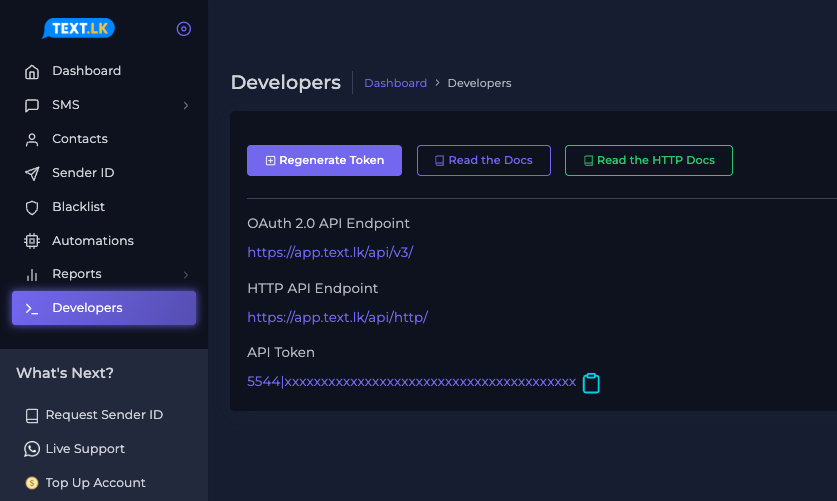
- From the left side menu, click “Developers”.
- You will see your API Token there — this is your API Key.
🔄 How to Regenerate Your API Token / API Key #
- Log in to your Text.lk dashboard.
- Go to “Developers”.
- Click “Regenerate Token” to generate a new one.
🔐 How to Use the API Key / API Token #
Your API Key is used for authentication.
You can use it in two ways: OAuth (Bearer Token) or HTTP Query Parameters.
✅ oAuth Method (Recommended) #
curl -X POST https://app.text.lk/api/v3/sms/send \
-H "Authorization: Bearer YOUR_API_TOKEN" \
-H "Content-Type: application/json" \
-H "Accept: application/json" \
-d '{
  "recipient": "94710000000",
  "sender_id": "TextLKDemo",
  "type": "plain",
  "message": "This is a test message"
}'🌐 HTTP Method #
https://app.text.lk/api/http/sms/send?recipient=94710000000&sender_id=TextLKDemo&message=test&api_token=YOUR_API_TOKEN📌 What You Can Do With Your API Key #
- 📤 Send SMS using Text.lk SMS API
- 👤 Manage Profiles (Text.lk Profile API)
- 📇 Manage Contacts (Text.lk Contacts API)
- 🗂️ Manage Contact Groups (Text.lk Contacts Groups API)
If you need help with integration, feel free to reach out! 😊


