
Flash SMS, also known as Class 0 SMS, is a special type of text message that appears instantly on a recipient’s screen, without requiring them to open their inbox. Unlike regular SMS messages, Flash SMS is designed for immediate visibility and urgency. In this article, let’s talk about What is Flash SMS?
What is a Flash SMS?
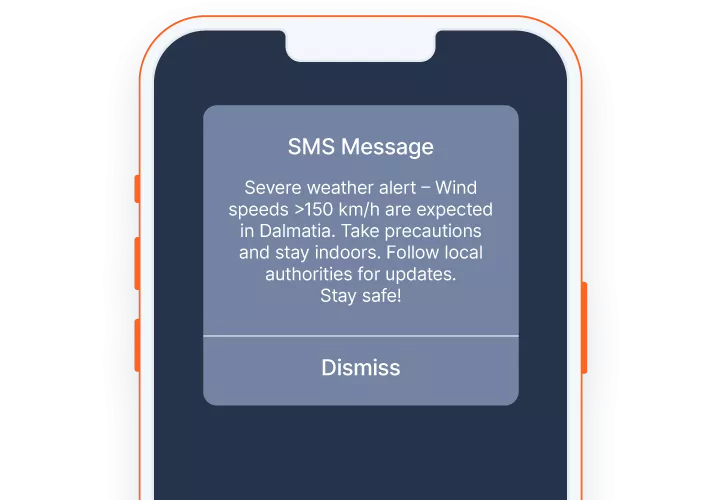
A Flash SMS (or Class 0 SMS) is a text message that appears immediately on a recipient’s screen, bypassing the inbox, and usually disappears once dismissed, often without being saved. It grabs instant attention, making it ideal for emergencies, urgent alerts, and one-time passwords (OTPs).
Flash SMS, or Class 0 SMS, is transmitted using the standard SMS protocols to deliver urgent, full-screen notifications that immediately pop up on the recipient’s screen.
How Flash SMS Works
The message will flash up on the customer’s lock screen or home screen (even if the phone is locked in some cases).
- It does not require user interaction to view.
- It is usually not stored in the message inbox.
- Once dismissed, it may disappear permanently.
This makes it fundamentally different from standard SMS behavior.
Key Features of Flash SMS
- Instant Display – No need to open messages
- High Visibility – Hard to ignore
- Temporary Nature – Often not saved
- Lightweight – Best for short messages
- No App Required – Works on all GSM-supported phones
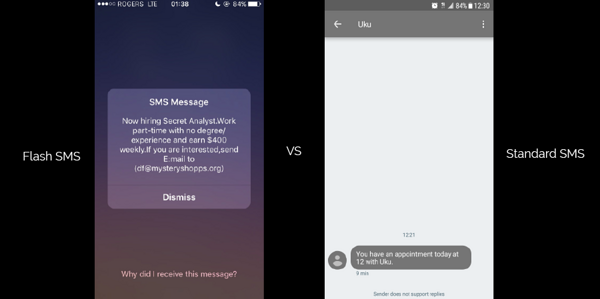
Flash SMS vs Normal SMS
| Feature | Flash SMS (Class 0) | Normal SMS |
|---|---|---|
| Display | Instant popup | Inbox notification |
| Storage | Usually not saved | Saved in inbox |
| Visibility | Very high | Medium |
| User Action | Not required to open | Must open message |
| Best Use Case | Urgent alerts, OTP | General communication |
Common Use Cases
Flash SMS is typically used when immediate attention is critical:
- One-Time Passwords (OTP)
- Security alerts
- Emergency notifications
- Transaction confirmations
- Critical system messages
Things to Consider
Flash SMS is powerful. But not always the best choice.
- Can feel intrusive if overused
- Not consistently supported across all devices
- No message history for users to refer back to
- Easy to dismiss accidentally
- Not suitable for long content
Because of this, it should be used selectively and responsibly.
When Should You Use Flash SMS?
Use Flash SMS only when:
- The message is urgent and time-sensitive
- You need guaranteed visibility
- The content is short and critical
- Sending an OTP or One-Time Password
- Sending emergency messages that must be seen ASAP
Avoid using it for:
- Marketing messages
- Long explanations
- Non-urgent notifications
- When sending phone numbers or important contents
⚠️ Important: Downsides of Flash SMS (Class 0)
Before using Flash SMS, consider the following limitations and risks:
- Not supported consistently across all devices
- Some smartphones may still store the message or not display it as a true flash message.
- Can feel annoying to users
- Messages appear instantly on screen, which may annoy users if overused.
- No message history (in most cases)
- Since messages are not saved, users cannot refer back to them later.
- User may accidentally dismiss the message
- Once closed, the content may be lost permanently.
- Not ideal for long or detailed content
- Best suited only for short, critical messages like OTPs.
- Potential compliance concerns
- Some regions or carriers may have restrictions on unsolicited flash messages.
How to Send Flash SMS?
Text.lk provides multiple ways to send Flash SMS depending on your workflow and technical setup.
⚡ Quick Send (Dashboard)
The easiest way to send a Flash SMS manually.
Steps:
- Create Text.lk account
- Go to Quick Send SMS
- Enter the recipient number and message
- Enable the Flash SMS option (toggle/checkbox)
- Click Send
Best for:
- One-time messages
- Testing
- Manual sending
📢 Bulk SMS Campaign Builder
Use this when sending Flash SMS to multiple recipients at once.
Steps:
- Create Text.lk account
- Go to Bulk SMS / Campaign Builder
- Upload or select your contact list
- Compose your message
- Enable Flash SMS mode
- Launch the campaign
Best for:
- OTP campaigns (rare cases)
- Critical alerts to many users
- System-wide notifications
👉 Note: Use Flash SMS carefully in bulk campaigns to avoid user annoyance.
🔗 Via Text.lk API (Developers)
For automated systems, you can send Flash SMS using the Text.lk API.
Sending Flash SMS via Text.lk API is simple. Just add: “is_flash”: true to your existing SMS API request, and your message will be delivered as a high-priority flash message.
👉 See also: How to get Text.lk API Key / API Token
Example 1: OAuth 2.0 POST Method (Bearer Token) – Recommended
curl -X POST https://app.text.lk/api/v3/sms/send \
-H "Authorization: Bearer YOUR_API_TOKEN" \
-H "Content-Type: application/json" \
-d '{
  "recipient": "94710000000",
  "sender_id": "TextLKDemo",
  "type": "plain",
  "message": "Your OTP is 123456",
  "is_flash": true
}'Example 2: HTTP GET Method (API Token in URL)
https://app.text.lk/api/http/sms/send?recipient=94710000000&sender_id=TextLKDemo&type=plain&message=Your%20OTP%20is%20123456&is_flash=true&api_token=YOUR_API_TOKENBest for:
- Web applications
- Mobile apps
- Backend systems
- OTP & authentication flows
Pros and Cons of Flash SMS
✅ Pros
- Grabs immediate attention
A popup on the lock screen is highly noticeable, making users more likely to check the message instantly. - Very low chance of being missed
Flash SMS takes priority over regular notifications and appears directly on screen. - Ideal for urgent and sensitive information
Useful for OTPs, PIN changes, delivery alerts, and security-related messages. - Does not consume device storage
Messages are typically not saved, reducing storage usage and leaving no trace after dismissal.
❌ Cons
- Privacy risk on the lock screen
Anyone nearby can see the message if it appears while the phone is locked. - The user may miss it permanently
Once dismissed, the message is usually gone with no way to retrieve it. - Can feel intrusive
Sudden pop-ups may annoy users if overused. - Sender identity is critical
If you don’t clearly set a sender ID, users may see it as a suspicious or unknown message.
👉 Always include a recognizable sender name to build trust.
Final Thoughts
Flash SMS is a high-impact messaging tool designed for situations where visibility matters more than persistence.
Used correctly, it can significantly improve user response rates, especially for things like OTPs and security alerts. But overusing it can reduce effectiveness and annoy users.
Frequently Asked Questions
Flash SMS
What is Flash SMS?
Flash SMS (Class 0 SMS) is a type of message that appears instantly on the recipient’s screen instead of going to the inbox.
It is designed for urgent, high-visibility communication and is usually not stored on the device by default.
How is Flash SMS different from normal SMS?
- Flash SMS appears instantly as a popup
- Normal SMS goes to the inbox
- Flash SMS is usually not saved
- Normal SMS is stored and can be revisited
👉 Flash SMS = visibility
👉 Normal SMS = persistenceWhen should I use Flash SMS?
Use Flash SMS when:
- Sending OTP codes
- Delivering security alerts
- Notifying urgent updates
- Sharing time-sensitive information
Avoid using it for marketing or long messages.
Is Flash SMS supported on all devices?
Not 100%.
- Most GSM devices support it
- Some smartphones may:
- Save it like a normal SMS
- Not display it as a true popup
👉 Behavior may vary by device and OS.
Is Flash SMS secure?
Partially.
✔ Good for quick delivery
❌ But has risks:
- Visible on lock screen
- Can be seen by others nearby
- No message history
👉 Use carefully for sensitive data.
Can users save or view Flash SMS later?
Usually no.
- Once dismissed, the message is gone
- Some devices may still store it (rare cases)
Can Flash SMS be missed?
Very unlikely. But possible.
- It appears instantly
- But if dismissed accidentally, it may be lost permanently
Does Flash SMS cost more than normal SMS?
In most cases, no. Pricing is typically the same as standard SMS in Text.lk
How do I send Flash SMS using Text.lk?
You can send Flash SMS in 3 ways:
- Send Flash SMS using Quick Send
- Send Flash SMS using Bulk SMS Campaign Builder
- Send Flash SMS using Text.lk API
- Learn how to send Flash SMS.
Can I send Flash SMS from the Text.lk dashboard?
Yes.
Method 1: Use Quick Send SMS:
- Enter recipient number
- Type your message
- Enable Flash SMS option
- Click send
👉 Best for manual sending and testing.
Method 2: Use the Bulk SMS Campaign Builder:
- Upload contact list
- Create your message
- Enable Flash SMS mode
- Send campaign
👉 Use responsibly to avoid user annoyance in Campaign Builder.
Method 3: Use Text.lk API:
👉 Read docuemntion for learn How to send Flash SMS via Text.lk API
How do I send Flash SMS via API?
Simply add this parameter:
"is_flash": true👉 Read docuemntion for learn How to send Flash SMS via Text.lk API
Do I need a different API endpoint for Flash SMS?
No.
- Use the same SMS endpoint
- Just add
"is_flash": true
Is OAuth or HTTP method better for Flash SMS?
Use OAuth 2.0 (Bearer Token).
- ✔ More secure
- ✔ Recommended for production
Use HTTP GET only for:
- Testing
- Legacy systems
Is Flash SMS good for marketing?
No.
- It can feel intrusive
- May annoy users
- Not suitable for promotions
👉 Use only for critical communication.
What are the biggest advantages of Flash SMS?
- Instant visibility
- Very high open rate
- Ideal for urgent alerts
- No storage on device
What are the main disadvantages of Flash SMS?
- Privacy concerns (lock screen visibility)
- No message history
- Can be intrusive
- Device compatibility varies